TL;DR: This Arma Reforger night combat guide starts with your scenario, current lighting conditions, and actual equipment. Check the map and available game light sources, then inspect display settings without assuming one brightness value fits every platform. Night grain was changed to default-off and off on official servers in a later 1.6 patch.
Night play combines game-world lighting, scenario conditions, equipment, and the player’s display. A dim scene, missing item, or different optic can have different explanations. Read the current context before copying a settings list or assuming every role has infantry night vision.
This guide explains visibility and interface checks in the video game. It does not claim a current-client night test, a measured detection distance, or universal monitor settings. The map navigation guide helps keep location references clear when the scene is difficult to read.
On this page
Arma Reforger night combat guide: the important correction
The 1.6 changelog initially introduced night grain to discourage gamma exploits. The November 21, 2025 correction then disabled it by default and on official servers, while allowing community servers to enable it.
The 1.9 changelog adds a night-vision optic specifically to the LAV-25 gunner seat and adds missing color lenses to the MX991 flashlight. These named additions are not a general promise that every infantry role carries night-vision equipment.
1. Identify the scenario and the lighting you are reading
Confirm the selected island, mode, and scenario before comparing your view with a video. A recorded session can use a different time, weather, location, or community setup. Similar terrain alone does not establish identical lighting.
Read the scenario information and the game-world conditions available to you. The 1.7 changelog adds a map button opening a weather report. That is scenario information, not a guarantee of a fixed visibility distance.
Compare the scene with a recognizable in-game reference. A road, coastline, named place, or illuminated feature can help you distinguish a location problem from a display problem. Avoid treating a guessed shape in the dark as a verified avatar position.
Keep direct observations and assumptions separate. "The road label is visible on the map" describes map information; "I can identify that junction in the scene" describes the view. One does not automatically prove the other.
If another player sees a different scene, compare scenario, location, equipment, and platform before copying their brightness. They may be using a vehicle optic or a different light source rather than a better version of the same ordinary view.
Preserve the actual game build when investigating a changed visual effect. Night grain changed after its introduction, and other rendering fixes can be platform-specific. An older screenshot should not determine the current default by itself.

2. Check the available light source and its specific context
Inspect the equipment your avatar actually carries and the actions it exposes. A flashlight, flare, and special optic are different tools. Selecting one does not grant the functionality of the others.
The 1.9 release adds three missing MX991 flashlight lenses: blue, green, and orange. Read the current item and its available controls before changing a color. The release note does not establish the same lens choices for every flashlight or modified asset.
The official Update 1.2 announcement introduced grenade-launched flares. Update 1.6 later added hand-fired flares. Those are distinct game item contexts; do not substitute one item’s old input for the other.
Check the item’s current description and use prompt in your installed client. This article does not specify a universal input, duration, brightness, or coverage radius for all flares. A named release addition is not a measured present-client parameter table.
Keep the intended result specific. Turning on a flashlight changes a light source associated with the game item; it does not prove every nearby character sees the same view. A light appearing in the scene is also different from every relevant map or interface label becoming readable.
If the item is missing, inspect the selected role and scenario content. The Workshop guide helps distinguish installed assets from content used by the session. A community equipment screenshot is not evidence that the official loadout includes that item.
3. Separate ordinary view, special optics, and display settings
The LAV-25 night-vision addition in 1.9 belongs specifically to its gunner seat. It should not be expanded into a claim that every passenger, vehicle, or infantry avatar has the same optic.
Read the current seat or equipment context before looking for that capability. Changing a normal display setting is not the same as activating a configured in-game optic. Another player’s footage can therefore differ even if both clients use the same monitor brightness.
Inspect the display and graphics options that your platform actually provides. Available entries and their effects can differ. This guide does not invent one recommended brightness, gamma, resolution scale, or contrast value for all hardware.
Change one relevant option at a time and compare a consistent scene or interface reference. That gives you a clearer observation than changing several settings together. Record what changed instead of describing the result as a tested universal improvement.
Keep readability and game mechanics separate. A screen label becoming easier to read does not establish a new avatar detection range or change the rules of a weapon, task, or objective. Do not infer those mechanics from a monitor adjustment.
If a particular interface appears wrong, record that interface and platform. A map label, flashlight effect, and special optic can involve different systems. A blanket "night is broken" report hides the stage that needs investigation.
4. Read the current night-grain and server context
Use the later 1.6.0.76 note when interpreting the default. It explicitly says night grain was disabled by default and disabled on official servers. Repeating only the original 1.6 introduction produces an outdated description.
The same correction lets community servers enable the feature. That means an official-session default is not a guarantee about every community scenario. Identify the selected session rather than assuming a different visual effect proves a client fault.
Do not treat a grain-like image artifact as confirmed server configuration from appearance alone. Compression, a captured video, display processing, or another setting can also affect the image. Check the session information and the actual symptom.
| What you observe | Check this context | Avoid this conclusion |
|---|---|---|
| The scene differs from a video | Scenario, location, time, weather, and build | One copied brightness value must fix it |
| A flashlight has different options | Actual item and exposed actions | Every flashlight has identical lenses |
| A vehicle view shows night vision | The specific seat and optic | All infantry now have the same capability |
| A grain effect appears | Current session and actual visual setting | Every server uses the original 1.6 default |
| A map label is readable but terrain is unclear | Map reference versus scene observation | The label proves exact avatar position |
| An item is absent | Role loadout and selected content | Every official session supplies the modded item |

Keep the final check tied to the selected client and session. The available light source, actual view, and current default behavior each need their own reference.

Keep map and voice descriptions useful at night
Agree on one identifiable destination rather than relying on a dark silhouette. Use the island, place name, or complete displayed reference from the map. If your current position is uncertain, preserve that uncertainty in the group message.
The radio guide separates voice paths and channels. A teammate hearing your message does not verify your location or confirm that they see the same light source.
Report what you actually observed: the relevant landmark, selected tool, or interface state. Avoid presenting a guessed avatar or distant shape as a verified identity. This is a game-information habit, not a claim that the map reveals every player.

Check one context before changing the whole setup
For example, if you can read the map but cannot identify a nearby scene feature, keep those two observations separate. Confirm the map destination first, then inspect the ordinary view and selected light source at the same location. Switching to a special vehicle optic introduces a new view context, so record that change rather than using it as proof that ordinary infantry brightness is wrong.
If a friend sends a screenshot, compare the location, equipment or seat, and scenario information before copying settings. An illuminated feature in their image may come from a different source. A compressed screenshot also does not demonstrate the full output of your display.
A useful comparison ends with the named view and what became readable. It does not establish a universal detection distance, a fixed visibility advantage, or one setting that every platform should use.
Choose one scene, one equipment view, and one interface reference for the first comparison. Keep them stable while reviewing a setting or light source. A switch to another vehicle or scenario can introduce a different rendering context and obscure the original question.
Record the platform, build, scenario, item or seat, and exact visual issue. If another player reproduces it, compare those same details. Two reports about different optics or different server defaults should not be combined into one supposed universal fault.
Finish this Arma Reforger night combat guide with the actual light or optic identified and the current scenario/default understood. Use the live client for missing values rather than inventing a universal brightness, flare radius, or detection distance.
Frequently asked questions
Is night grain always enabled?
No. The November 2025 correction disabled it by default and on official servers. Community servers can enable it. Check the selected session and newer note rather than relying only on the original 1.6 introduction.
Did Update 1.9 give every infantry player night vision?
The cited addition is specifically a night-vision optic for the LAV-25 gunner seat. It does not establish universal infantry equipment. Read the actual role, item, and scenario.
Can I use one brightness value on every platform?
This guide has no measured universal setting. Compare the options your client provides using a consistent reference, and keep platform, display, scenario, and equipment context in the record.
Are hand-fired and launched flares the same input?
They are distinct game item contexts introduced in different updates. Read the current item description and use prompt rather than copying one old action for every flare.
Sources and update scope
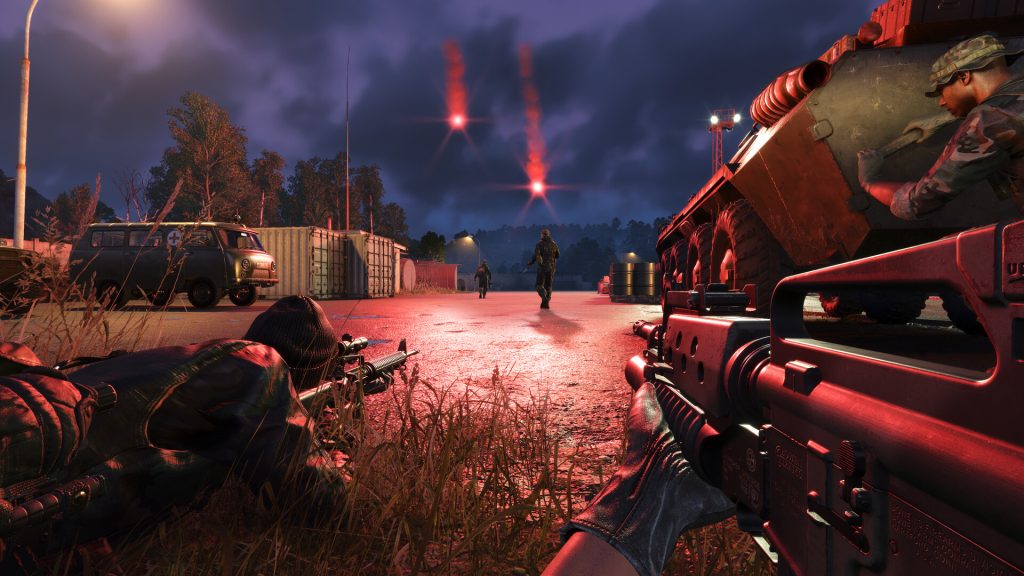
Read on November 8, 2026: Update 1.2 flare announcement, 1.6 additions, 1.6.0.76 night-grain correction, 1.7 weather-map addition, and 1.9 flashlight/optic changes. No current lighting, item duration, detection distance, or graphics benchmark was tested. Official screenshots are contextual scenes rather than controlled visibility comparisons.
Sources and further reading
- https://reforger.armaplatform.com/news/changelog-october-30-2025
- https://reforger.armaplatform.com/news/update-november-21-2025
- https://reforger.armaplatform.com/news/changelog-november-4-2026
- https://reforger.armaplatform.com/news/changelog-may-28-2026
- https://steamcommunity.com/games/1874880/announcements/detail/4257672198473614320