TL;DR: The best co op games for non gamers match the control a new player wants to learn. Start with Snipperclips for discussing puzzles, Untitled Goose Game for playful shared tasks, Unravel Two for side-on movement, Stardew Valley for a shared farm, or PowerWash Simulator for relaxed online cleaning.
For a first same-room session, Snipperclips or Untitled Goose Game is a better starting point than a complicated action campaign. For two people playing remotely, Stardew Valley on matched PC editions or the original PowerWash Simulator’s two-person Career gives each person useful work. Ask what activity interests the new player before choosing by how “easy” a game looks.

On this page
Best Co Op Games for Non Gamers: Choose the Controls
The useful criteria are camera demands, timing pressure, menu complexity, the cost of mistakes and whether the new player has a real role. These picks use official descriptions and supported modes, followed by editorial judgments about fit. No personal testing or guarantee that every beginner will enjoy every game is claimed.
| Game | Recommended setup | Main skill to learn | Why it fits |
|---|---|---|---|
| Snipperclips | 2 local on original Switch | Move, rotate and cut shapes | You can discuss the same puzzle |
| Untitled Goose Game | 2 local on PC or consoles | Move and interact in a shared scene | Clear playful tasks without combat |
| Unravel Two | 2 local on PC or consoles | Jump and coordinate rope movement | Side-on view avoids camera control |
| Stardew Valley | 2 on matched PC local or online | Tools, inventory and passing days | Different useful farm jobs |
| PowerWash Simulator | 2 online Career on separate supported devices | Move a camera and aim water | No Career timer or final score |
Cute art does not remove a learning barrier. A person can understand a goal and still struggle to move and look at the same time. Another can use the controller comfortably but dislike timers. Choose the first session around the specific difficulty instead of treating all new players as the same.
1. Snipperclips: start by talking through a visible puzzle
Snipperclips is useful for two people sharing an original Switch because both can see the same objects and propose a shape to try. The paper characters cut each other into useful outlines. That turns cooperation into a conversation and an experiment rather than a test of fast aiming.
Give the new player time to move and rotate their character before explaining every solution. Let them make the next suggestion, even if the first shape does not work. Being a participant who proposes a plan is more engaging than being told which button to press after the experienced player has solved everything.
The main pair’s puzzles work locally; Nintendo also documents cooperative Party mode for up to four. There is no native online co-op here. The drawback is that puzzle frustration is still possible, so switch tasks or stop if repeated cutting feels tiresome rather than entertaining.
2. Untitled Goose Game: start with a playful shared task
Untitled Goose Game offers two-player local cooperation through the whole game. Its official Nintendo listing also confirms single Joy-Con support for each player on Switch. Two geese share a village and work on pranks, which gives a new player a clear reason to move around and interact with objects.
It is a good fit when the person prefers humor and exploration to fighting. One player can distract a villager while the other experiments with the object involved in a task. Talk through a plan and let the beginner choose which goose job sounds appealing.
The drawback is that objectives can require inference and timing around villagers. It is not a promise of effortless progress. The developer’s two-player addition is local cooperation, so friends in different homes should choose a documented online game or separately evaluate streaming; a local multiplayer update is not a native crossplay lobby.
3. Unravel Two: start with side-on movement
Unravel Two is worth choosing when the new player wants to learn platforming without independently controlling a three-dimensional camera. Its two Yarnys share a side-on scene and use their connecting yarn to solve movement problems. The official description identifies local co-op, including the PC release used for this recommendation.
Play slowly enough for both people to understand what the rope is doing. Describe the position or goal instead of repeatedly naming buttons: “stand on the ledge while I try this route” connects the action to a purpose. Let the beginner practice a movement before both characters attempt a complicated solution.
Precision jumping is the drawback. A simple camera can still accompany a difficult jump, so choose another game if repeated movement failures drain the person’s interest. There is no native online co-op lobby in the documented PC feature list; Steam user tags should not be used to promise one.

4. Stardew Valley: start with one useful farm job
Stardew Valley works for a new player who likes building a routine and seeing a project grow. On PC it supports local split-screen, LAN and online cooperation, and the official 1.6 notes expand PC online groups to eight. A pair can share a modest farm without recruiting anyone else.
Begin with one job the person chose, such as watering a small patch or gathering nearby resources. Explain tools and inventory as those tasks need them. A long list of optimal crops, profits and deadline advice can make a welcoming farm feel like an assignment before the player has learned to move.
The drawback is the combination of menus and passing time. Multiplayer does not turn every moment into an unlimited pause, and someone unfamiliar with inventory management can feel hurried. Keep the early goals small and agree on the pace. This online recommendation uses matched PC versions; do not assume a console copy joins the same PC farm through crossplay.
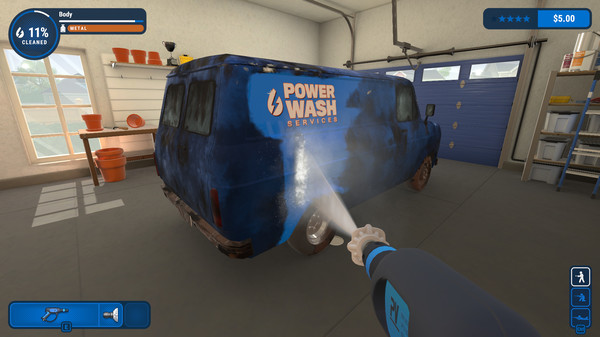
5. PowerWash Simulator: start with a low-pressure online job
The original PowerWash Simulator is a useful remote option if the new player is willing to learn first-person movement. The publisher describes Career without a time limit or final score, and it supports one host plus one helper. A person can contribute immediately by cleaning a visible section rather than learning combat abilities.
Assign a clear area and let the newcomer experiment with water coverage and positioning. Avoid correcting every inefficient movement. The task gives immediate visual feedback: dirt disappears, and the cleaner can see which part they changed. That is a helpful way to learn aiming while having a real role in the shared job.
The drawback is the camera itself. Moving and looking at the same time can be difficult for a first-time player, even without enemies. Adjust settings and practice on a simple surface before picking a complicated location. The first game has online co-op rather than local split-screen; two people beside one console cannot join just by pairing a second controller. Check exact mixed-platform compatibility before a purchase.
Make the first session comfortable
Connect the inputs and set a practical viewing distance before teaching. Explain one action, let the person try it, and add another only when needed. Avoid taking over their controller after every mistake. Offer a choice between trying again, receiving a hint or changing the task.
Set a small goal with a natural stopping point: one puzzle, one prank, a short platforming section, a farm day or a portion of a cleaning job. Ask whether the person wants another after that. Interest and confidence are more useful measures of a good first session than completion speed.
Should an experienced player always control the main character?
No. Give the new player a role they want, and use your experience to support it. A helper arrangement can work, but deciding it automatically can leave someone excluded from the game’s most interesting actions. Discuss the roles first and swap when useful.
Are timed co-op games always a bad choice?
No. Some beginners enjoy pressure after they understand the controls. Start with a slower task if timing is the current barrier, then try a timed game together when the person wants it. Our PS5 couch guide includes Overcooked’s documented Assist Mode for that transition.
Next step: Choose the activity that interests the new player, confirm local or online setup, and play one short task. Let their preference set the next session’s pace instead of using a universal beginner ranking.
Sources and version notes
- Snipperclips™ – Cut it out, together! for Nintendo Switch – Nintendo Official Site
- Untitled Goose Game
- Untitled Goose Game for Nintendo Switch – Nintendo Official Site
- Unravel Two on Steam
- Stardew Valley on Steam
- Stardew Valley – Stardew Valley 1.6 Update Full Changelog
- PowerWash Simulator on Steam
- PowerWash Simulator | A super-soothing FuturLab experience
Official developer, publisher and storefront pages read November 11, 2026. Recommendations reflect documented features and editorial fit; no personal playtest, price comparison, benchmark or measured SEO score is claimed. Platform and mode limits refer to the editions named in the article.
Sources and further reading
- Snipperclips™ – Cut it out, together! for Nintendo Switch - Nintendo Official Site
- Untitled Goose Game
- Untitled Goose Game for Nintendo Switch - Nintendo Official Site
- Unravel Two on Steam
- Stardew Valley on Steam
- Stardew Valley - Stardew Valley 1.6 Update Full Changelog
- PowerWash Simulator on Steam
- PowerWash Simulator | A super-soothing FuturLab experience