TL;DR: Work through one object or section at a time, change your angle when dirt survives, and use the job details to find the unfinished part near the end. A wider nozzle covers more area, while a narrower nozzle cuts tougher dirt at a smaller spot. Save early Career money for equipment that solves a recurring problem.
These PowerWash Simulator beginner tips apply to the original game. Career Mode has no normal time-pressure score, so you can learn the controls and clean methodically. Challenge Mode adds separate time or water restrictions; advice written for a challenge is not automatically the best way to enjoy an ordinary first Career job.

On this page
PowerWash Simulator Beginner Tips: Start With One Section
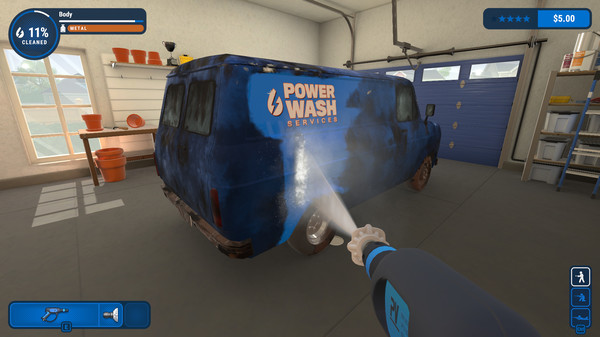
Choose a manageable object or surface instead of sweeping the whole scene with no plan. On an early vehicle, work around one side and its attached details before moving to the next. On a location, use visible boundaries such as walls, stairs, and separate furniture to divide the job.
Cleaning a large area in scattered passes can leave tiny patches everywhere. A section-by-section route reduces the number of places you need to inspect at the end. The purpose is to keep track of progress, not to impose a particular cleaning order on every level.
When an individual part finishes, use that as a checkpoint. Look for neighbouring edges or attached objects that are still dirty before leaving the area. A scene can contain separate parts that look like one item, so apparent visual cleanliness is not always the same as every part being completed.
1. Read the Job Details Before the Final Sweep
The job list tells you what remains unfinished. Consult it when the overall percentage is high instead of spraying the entire location again. Find the name of the remaining part, locate it in the scene, and inspect the surfaces that were difficult to see from your original position.
Use the available dirt-visibility or part-selection controls in your current interface. Key bindings can differ by platform and customization, so learn the named action in Options rather than copying every keyboard prompt from a video.
A rail, trim piece, wheel detail, or underside can be separate from the large surface beside it. If the list still shows a part unfinished, inspect that exact part rather than assuming the remaining dirt must be on the largest object in the level.
2. Match Nozzle Width to the Dirt
The white 40-degree fan covers the largest area but provides the least pressure of the standard nozzles. Green at 25 degrees is a general compromise, yellow at 15 degrees is a narrower stronger fan, and red at zero degrees focuses the strongest pressure into a tiny spot.
Use wider coverage where the surface cleans readily and narrow the stream when the same dirt survives a pass. Staying with the red nozzle for a giant easy wall wastes coverage, while staying with white on stubborn grime can make you repeat a pass that barely changes anything.
Our nozzle guide explains the standard and purchased options. Practice with the four standard choices before assuming that every difficult patch requires an additional purchase.
3. Move Closer and Change the Angle
Water loses useful effectiveness when the target is beyond the equipment’s working range. If a pass does little, move closer when practical and aim at the dirt directly. A broad stream striking at an awkward angle is not the same as a focused stream reaching the surface.
Walk around the object, crouch, or climb to a different viewpoint when the dirt is behind an edge. Spraying the visible face repeatedly will not necessarily reach a ledge underneath it. The change of position can solve the problem without using cleaning liquid.
Avoid treating the crosshair’s apparent direction as proof the water is reaching the desired part. A closer object, lip, or railing can intercept the stream. Check the actual area changing under the spray and reposition when the target remains unchanged.
4. Rotate the Fan for Edges and Strips
The fan nozzles can be rotated between horizontal and vertical orientation. The standard keyboard binding listed in the nozzle reference is R, but check your controls if you have remapped it or play on a controller.
A vertical fan fits narrow upright surfaces, while a horizontal one can suit long horizontal strips. Match the shape of the spray to the shape you are cleaning so less of the stream misses the target.
The rotating Turbo nozzle and Soap nozzle follow different rules and cannot use the same fan-rotation action. If a purchased nozzle does not rotate, read its type rather than assuming a control has stopped working.

5. Use Reach Tools for a Real Reach Problem
Extensions increase reach, but long extensions can be awkward when very close to the surface. Move to a useful working distance or remove the extension for nearby detail instead of keeping the longest option attached for every task.
Use available ladders or other access equipment where the job provides them. A better angle from the right height can be more practical than spraying every upper surface from the ground. Check for still-dirty edges after relocating.
Buy equipment for a repeated limitation. The starting Prime Vista 1500 can complete early learning tasks, while stronger washers unlock through Career progress and shop purchases. Saving for a useful washer can matter more than buying every attachment before you understand its purpose.
6. Treat Soap as a Tool, Not a Requirement
The Soap nozzle needs the appropriate cleaning liquid to work as intended. Matching the liquid to the surface material helps tackle stubborn dirt. An empty or inappropriate soap setup is not a substitute for the pressure of a normal nozzle.
Career cleaning liquids cost in-game money, so try distance, angle, and a narrower standard nozzle first when a spot resists. Soap can be convenient, but spending your early cash on repeated liquid purchases can delay a washer upgrade.
Free Play uses different supply rules, including unlimited cleaning liquids according to the reviewed mode reference. Do not assume that convenience carries into Career, and do not copy a Career spending restriction into a relaxed Free Play replay.
7. Keep Career and Free Play Progress Separate
Career unlocks jobs and equipment through its own progression. Free Play lets you revisit completed jobs rather than replacing the original Career completion sequence. Pick the mode that matches whether you want to progress or replay.
Career co-op supports two players, while Free Play supports up to six. A group too large for the Career lobby should choose the appropriate replay mode instead of assuming a larger lobby will advance every player’s campaign.
Use the co-op explanation before arranging a session. It distinguishes the host’s current job, replay modes, paid packs, and the first game from PowerWash Simulator 2.
8. Finish With a Targeted Inspection
At the end, read the remaining part list and inspect the less obvious sides of those objects. Undersides, corners, seams, and thin edges deserve attention because they are easy to miss from one standing position.
Keep the last sweep narrow. Re-cleaning finished surfaces does not tell you where the missing patch is. Name the remaining part, choose a stronger or more accurate nozzle if needed, and work around it until its completion registers.
Frequently Asked Questions
Do I need to rush Career jobs?
No normal time-pressure score applies to Career Mode. Challenge Mode has separate rules, so choose it deliberately if you want a timed or water-limited task.
Why is the job stuck near completion?
Check the unfinished part list and the hidden sides of the named object. A tiny underside or edge can remain dirty even when the scene looks clean from the main angle.
Should I buy soap before a stronger washer?
Buy for the problem you repeatedly face. Soap can help particular materials, but testing nozzle, distance and angle first can preserve Career cash for a more useful equipment upgrade.
Next step: Finish one section, read the unfinished part list, and use the narrowest useful adjustment for the next stubborn patch. Keep the routine consistent before buying tools you have not yet needed.
Sources and Version Notes
- PowerWash Simulator official Steam product description
- Official PowerWash Simulator Wiki: Nozzles
- Official PowerWash Simulator Wiki: Power Washers and Extensions
- Official PowerWash Simulator Wiki: Career Mode
- Official PowerWash Simulator Wiki: Free Play
Sources read November 11, 2026. This article covers the original game and the stated edition or mode. Source-backed explanations are not claimed as personal playtesting, and newer patches can change interface details.