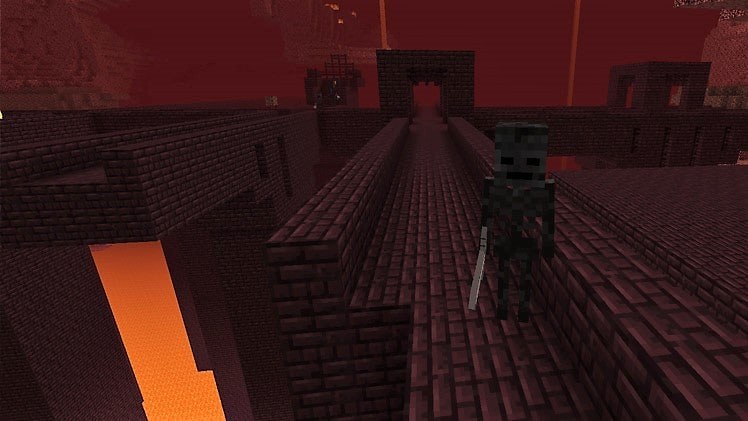
TL;DR: Record your portal coordinates, travel through new Nether terrain, and look for long dark nether-brick bridges, pillars, and enclosed corridors. Use safe viewpoints and a marked route instead of wandering in circles. There is no direction, fixed distance, or single Y level that guarantees a fortress.
This Minecraft how to find a Nether fortress guide uses a repeatable search route with safe checkpoints. Fortresses can generate in every Nether biome and can be partly buried, so you must examine more than the open horizon. A bastion’s dark blocks do not make it a fortress; identify the structure’s bridges and corridor layout before entering.
The first visit is usually about getting blaze rods and useful supplies home. Finding the structure and surviving it are separate tasks, so keep a retreat route even when the fortress looks close.

On this page
Minecraft How to Find a Nether Fortress: Start at the Portal
Your portal is the reference point for the whole trip. Note its X, Y, and Z coordinates as soon as you enter the Nether, then build a small protected arrival area if the portal is exposed. Put spare supplies there before venturing beyond a route you can retrace.
Bring armor, food, a pickaxe, blocks for barriers, and a ranged weapon if available. A gold armor piece helps with ordinary piglin hostility, but does not protect you from every Nether threat. Keep enough blocks to make an emergency shelter rather than spending the entire stack on a bridge.
1. Make a Search Lane Through New Terrain
Pick a broad direction and move through terrain you have not already searched. Record each important turn and opening. If an impassable lava sea or cliff interrupts the lane, take a safe detour and keep tracking where it leads instead of pretending the route is still straight.
There is no universal east-west or north-south trick that makes a fortress appear. Direction can help organize exploration, but it is not a guarantee built into every seed. When you have thoroughly inspected one corridor, choose a parallel lane or a different sector rather than retracing the same view repeatedly.
Set a travel budget based on supplies. For example, return when you have used half your food or building blocks, leaving the other half for getting home. A convenient checkpoint distance is a route-planning choice, not the maximum distance a fortress can be from your portal.
2. Search from Secure Viewpoints
An open lava sea can reveal the tall pillars and bridges of a fortress from a distance. Reach a sheltered ledge, stop moving, and scan the skyline carefully. You should be able to step back into cover if a ghast starts firing.
A higher viewpoint is useful only if you can reach it safely. Do not build a thin, exposed tower solely for a better screenshot of the horizon. Render distance controls how far you can see, and the device or server may limit the usable distance regardless of your route.
Fortresses can also cut through netherrack. If the landscape is solid, a carefully placed tunnel can expose a corridor that was invisible from outside. Watch for dark nether-brick surfaces, not just the full silhouette of an open bridge.
3. Tell a Fortress from a Bastion
A Nether fortress uses nether bricks in long bridges, intersections, pillars, and corridors. A bastion remnant uses a different ruined layout dominated by blackstone-related blocks and piglin activity. Both can appear dark at a distance, so approach closely enough to identify the architecture before deciding you have found your goal.
The distinction matters for blaze rods. Fortresses host blazes and wither skeletons; wandering through a bastion is not a substitute for locating blaze spawns. A bastion can still be valuable, but it is a separate expedition with different dangers.
Current documented structure generation divides the Nether into regions where fortress and bastion placement interact. This explains why one explored sector might offer a bastion instead. It does not create a simple “walk this many blocks from the bastion” instruction that always works.

4. Mark Every Route You Will Need Twice
Place distinctive blocks or other clear markers at junctions, especially where your return direction could be mistaken for an unexplored branch. Record a few intermediate coordinates along a long journey. The fortress coordinate alone does not tell you how to cross the terrain between it and the portal.
If you build a bridge, make it wide and protected enough for the risks around it. Inspect the landing before stepping across. A rushed shortcut over lava can turn a successful search into a failed return trip.
Once you find nether bricks, note the entrance and portal route immediately. Do this before chasing a mob or opening a chest. If you die later, a clear record gives you a chance to recover without having to repeat the entire search.
5. Enter with a Small, Specific Goal
Secure an entrance, make cover, and inspect the nearest intersections. Blazes attack at range, while wither skeletons make open corridors dangerous. Use barriers and controlled lines of sight rather than fighting every visible mob at once.
Keep a blaze spawner intact if you want a repeatable source of rods later. Destroying it for a little immediate convenience can remove a useful resource point. Collect the rods you need, then leave the remaining fortress for a better-equipped return visit.
Nether wart rooms are useful finds, but a particular fortress layout is not guaranteed to give you every room you want. If you find wart on soul sand, collect planting supplies as well as the wart itself so you can establish a safer crop at home. Do not claim the entire expedition failed because one room was absent.
6. Use Commands Only if They Fit Your World Rules
If commands are allowed, locate is the direct alternative to manual searching. In Java releases using modern structure syntax, the command is /locate structure minecraft:fortress. Bedrock releases with the corresponding syntax use /locate structure fortress. Confirm the command through autocomplete if your release differs.
Run the search while in the Nether and remember that a coordinate result is not a protected path. You can still arrive above lava or inside difficult terrain. A copied test world can also help you investigate a seed while leaving the main save’s play rules intact.
On servers, respect the owner’s exploration rules. A seed map or locate result may be unavailable or intentionally restricted. You can still make progress by searching organized new sectors and recording which ones you have checked.
Frequently Asked Questions
What is the best Y level for finding a fortress?
There is no single guaranteed search height. Use accessible viewpoints to spot pillars and bridges, and inspect buried terrain when the horizon offers no clues. Choose safety and visibility over a rigid coordinate.
Can a fortress generate in a basalt delta?
Yes. Fortresses can generate in all Nether biomes. The difficult terrain in a basalt delta can make travel and visibility inconvenient, but it does not rule out the structure.
Does finding a bastion mean a fortress is nearby?
It tells you something about the searched sector, but it does not guarantee a fortress at a specific nearby distance. Move through new regions rather than circling the bastion indefinitely.
Why did I find no blaze rods after killing mobs?
Blaze rods come from blazes under their normal drop conditions, not every fortress mob. Drops are not guaranteed from each kill. Keep the spawner available and inspect the mobs you are actually fighting.
Next step: Record your portal, choose a search lane, and return with your first useful supplies before clearing the whole structure. For equipment preparation, read the enchantment order guide and visit the Minecraft hub.
Sources and Version Notes
- Minecraft Wiki: Nether Fortress, modern regional generation, buried structures, and layout; readable source reviewed November 10, 2026.
- Minecraft: Block of the Week, Nether Brick, official visual and structural context from 2018; historical claims of exclusive wart availability are not used.
- Minecraft: Meet the Blaze, official blaze and rod context.