TL;DR: This Squad review recommends the game to Windows PC players who want communication to shape large multiplayer matches. Choose it for its nine-person squads, built-in voice channels and organized team experience. Look elsewhere if your main priorities are a long solo campaign, a console purchase or reliable enjoyment without speaking to strangers.
Squad is a sensible purchase when you enjoy learning a shared game system with other people. Its strongest buying argument is the relationship between its large matches and small voice-connected groups. The important qualification is that a server community and your willingness to communicate can matter as much as the advertised feature list.
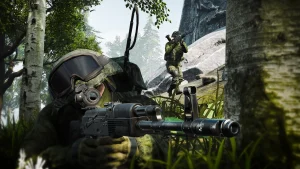
This is a research-based assessment of official product information checked on November 8, 2026. We did not conduct hands-on testing, measure frame rates or collect our own player survey. The screenshots are official publisher images supplied through Steam, rather than captures from our own play session. Performance and community quality therefore remain questions to investigate before purchasing.
On this page
Squad review: five useful buying checks
We assessed five things a buyer can actually decide before installing: the kind of session you want, the communication commitment, content outside standard multiplayer, platform and hardware suitability, and purchase value. These criteria come from the official Steam description, its system requirements and its US storefront price. They do not produce a numerical review score or establish which game has the best community.
Treat your answers as conditions, rather than points to add together. A good price cannot solve the absence of your preferred platform. A broad map selection cannot replace a solo campaign if that is what you wanted. Equally, an intimidating introduction does not automatically make Squad unsuitable when learning a shared system is the reason you are buying it.
| Buying check | Verified product detail | What it means for your purchase |
|---|---|---|
| Session type | Large PvP matches described as fifty versus fifty | Choose it when you want a shared multiplayer session |
| Communication | Local, squad and leadership voice contexts | Plan for a microphone and attention to other players |
| Other content | Fireteam supports up to five-player co-op | Current Squad has a cooperative option as well as PvP |
| Platform and hardware | Current Steam listing identifies Windows | Check your machine against the listed requirements |
| Cost | US Steam price was $39.99 on November 8, 2026 | Recheck the offer and included content at checkout |

1. Decide whether the multiplayer session fits your evenings
Squad makes more sense as a shared multiplayer activity than as a personal checklist of unlocks. The official description combines fifty-versus-fifty matches with nine-person squads. That structure gives a buyer two scales to consider: the size of the overall game and the smaller group through which you experience it. Enjoying a busy match does not require wanting to manage every conversation yourself.
Your first purchasing question should be about the time and attention available on an ordinary evening. Can you listen, learn unfamiliar labels and remain involved when the game is not offering immediate personal feedback? Or do you usually play while handling interruptions? We have not measured a typical match length, so there is no promised session duration here. The useful distinction is the degree of participation you want.
A friend group can make the initial social experience more predictable, but it is not a substitute for checking a server’s entry rules. Public communities can have their own expectations about language, conduct and familiarity. Read visible descriptions before joining and ask ordinary software questions when a menu or label is unclear. Those actions help you assess fit without assuming every server welcomes newcomers in exactly the same way.
The main drawback for this criterion is that enjoying the advertised large-scale format does not guarantee enjoying a particular group. This review cannot certify server moderation, waiting times or the quality of conversations. If a purchase depends on a specific community, examine that community directly. A broad claim that Squad always produces good teamwork would hide the uncertainty most relevant to a new player.

2. Be honest about the communication commitment
Voice communication is a central reason to choose Squad. Its official store description identifies voice contexts for nearby players, squad members and leaders. These channels are part of the product’s organization, rather than an optional cosmetic feature. A buyer who likes conversation about a shared activity has a stronger reason to choose Squad than someone who only wants a military setting.
You do not need to purchase the game with the intention of becoming a group leader. There is a meaningful difference between following a conversation and taking responsibility for coordinating one. Begin by deciding whether you are comfortable listening, acknowledging a question and describing an interface problem clearly. That is a more realistic beginner expectation than imagining that every new player must immediately direct everyone else.
Check your practical setup too. Steam’s requirements mention a microphone. Confirm that your preferred headset works with Windows, that you can hear speech comfortably and that your room permits speaking during the hours you normally play. This is not a claim that expensive audio equipment improves results. It is a purchasing check: a voice-centered game can be a poor fit for an environment where you cannot use voice.
The drawback is an ongoing social demand. If silence is what makes gaming relaxing for you, the feature that attracts other buyers can become a source of friction. Squad is still a game, and nobody should treat purchasing it as a commitment to tolerate abusive behavior. Assess community rules and moderation as part of your choice, without taking an official feature description as proof of a welcoming atmosphere.
3. Check what you want beyond the main PvP format
Current Squad information should not repeat the old claim that the game has no cooperative content. The official Steam description now includes Fireteam PvE, with support for up to five players and four missions available to all Squad players. This adds a relevant option for a small group deciding whether it wants the game only for public multiplayer matches.
That verified feature does not establish the size or longevity of the cooperative experience for your group. Four included missions are a specific product fact, not a promise of a long narrative campaign. We have not tested replay variation, mission duration or how a five-person group experiences the current release. If co-op is the main reason for purchasing, read current Fireteam details and evaluate those missions on their own merits.
Squad also lists Steam Workshop support. For a buyer, that means community content is part of the game’s documented ecosystem. It does not mean every server uses the same downloads, that every item remains compatible or that any particular project receives ongoing maintenance. Before following a server with extra content, inspect its requirements and the relevant item pages. Keep official included content separate from optional community additions.
If your priority is a flexible editor and campaign-centered sandbox, compare the purchase with Squad vs Arma 3. If you are choosing between current console access and a Windows multiplayer community, Squad vs Arma Reforger addresses that different decision. Those are useful alternatives because they change the purchase conditions, rather than merely providing another visual setting.
The limitation here is scope. Cooperative content and Workshop access broaden the product, but neither should be inflated into a claim that Squad fulfills every kind of military game request. A newcomer asking for a private campaign, a creator asking for extensive editing tools and a public-server regular are shopping for different experiences. Decide which experience is essential before counting modes as interchangeable advantages.
4. Match the Windows requirements to your actual computer
The Steam platform listing checked for this review identifies Windows. The listed minimum requirements include Windows 10 x64, eight gigabytes of RAM and a six-gigabyte graphics-memory qualification for the specified older graphics cards. The recommended specification includes Windows 11, sixteen gigabytes of RAM, an Intel i5-12400 or Ryzen 5600, and an RTX 3060 or RX 6600 XT. The storage listing is sixty-five gigabytes.
These figures describe publisher requirements. They do not tell us what frame rate a particular computer will achieve, which resolution is comfortable or how busy multiplayer scenes perform. We have not run controlled tests, and matching a named component is not a benchmark result. Treat the specification as an eligibility check before seeking current evidence from a machine close to yours.
Compare your complete system, including operating system and available storage, rather than looking only at the graphics-card name. Leave room for the normal maintenance of your computer and any additional community downloads you choose to use. This review does not calculate their size. A stated base storage requirement cannot predict the total space required by every optional Workshop collection or later update.
Broadband internet is listed too, but a general connection requirement does not establish your experience with a particular server. Region, local network conditions and the chosen community are practical checks you must make independently. Avoid treating a hardware upgrade as a guaranteed solution to every multiplayer problem. Likewise, a connection complaint from an unrelated setup does not prove the same problem will affect your purchase.
If you need macOS, Linux or a console, this research does not verify a native Squad release for that platform. Do not buy on the assumption that an unlisted configuration will provide supported access. Check current official information before payment. Platform suitability is a purchasing gate, and it deserves a clearer answer than an unsupported suggestion that software can probably be made to work.

5. Judge value by what you will actually use
Squad’s US Steam price was $39.99 when checked on November 8, 2026, with no discount shown in that snapshot. This is a dated Windows storefront observation, not a permanent price or a promise about another region. Check the official listing again when you are ready to purchase, including the selected package and any optional items.
The current description discusses optional Supporter and Founder packs alongside Fireteam information. We do not infer that every optional item is required to use the four included missions. Read each package’s exact contents before treating it as necessary. A comparison becomes misleading when the base purchase of one game is measured against an expanded bundle of another without explaining the difference.
For someone who regularly chooses voice-centered public multiplayer, the base game has a coherent value argument. For someone purchasing mainly because screenshots look impressive, that argument is weaker. The images establish the game’s visual setting; they cannot establish the comfort of joining a community or the performance of your hardware. Base your decision on the activity you want to repeat.
If price dominates your choice, a competing sale can change the immediate calculation. Our Squad vs Hell Let Loose comparison records the same-date US offers and explains why the discounted price should not erase differences in setting and content. Do not assume a sale will still be available when reading this review later. Value is specific to the current offer and your intended use.

Before your first purchase, read one interface guide
An interface guide is a useful way to sample the learning commitment without confusing a review with a tutorial. Read the Squad map reading guide to see the kind of labels and information panels you will encounter. The RAAS guide and Invasion mode guide explain mode-specific displays on separate pages.
You do not need to memorize those pages before deciding. Their purpose at this stage is to reveal whether learning the game’s language sounds interesting or tedious to you. Keep this buying decision focused on session fit, communication, included content, supported access and price. Choose Squad when those conditions line up; defer the purchase when one of your essential conditions remains unverified.
Frequently asked questions
Is Squad worth buying for a newcomer?
Squad is worth considering when a newcomer wants voice-connected multiplayer and accepts learning its interface with other players. The documented features support that recommendation, but we cannot guarantee a beginner-friendly experience on every server. Check community rules, your microphone setup and your computer before purchasing. A military theme alone is an incomplete reason to choose it.
Does Squad have co-op now?
Yes. The official Steam description checked on November 8, 2026 lists Fireteam PvE for up to five players, with four missions available to all Squad players. This corrects older descriptions that characterize Squad as exclusively PvP. It does not establish a long solo campaign or the replay value of those missions, neither of which we tested.
Do you need a microphone for Squad?
Plan on having one. Steam’s requirements mention a microphone, and the game’s documented local, squad and leadership voice contexts are central to its multiplayer organization. That does not mean a newcomer must become a leader. It means your normal playing environment should allow you to listen and respond comfortably when participating in a group.
Will Squad run well on my PC?
The published minimum and recommended specifications are the starting point, but they cannot answer how your exact PC will perform. This review contains no frame-rate tests. Compare your operating system, processor, graphics hardware, memory and storage with the current listing, then seek recent evidence from a comparable configuration before relying on a performance expectation.
Sources and update scope
Official Squad facts and US price: Steam product page and US English appdetails, read November 8, 2026. The four image slots use official publisher Steam screenshots. Recheck price at purchase and refresh this assessment when content, platform support or system requirements change. This article has no invented playtest rating or performance benchmark.